Ошибка файловой системы 1073741819 в Windows 7, 10 как исправить?
Некоторые пользователи операционной системы Windows при запуске какого-либо приложения с правами администратора могут столкнуться с ошибкой «Ошибка файловой системы 1073741819». Довольно часто это происходит при переходе и соответствующем обновлении с Windows 7 на Windows 10, но бывают случаи, что с данной проблемой встречаются пользователями Windows 7 и Windows 8. В этой статье я расскажу, в чём суть ошибки данной дисфункции каковы её причины, и как исправить ошибку файловой системы на ваших ПК.
Причины ошибки
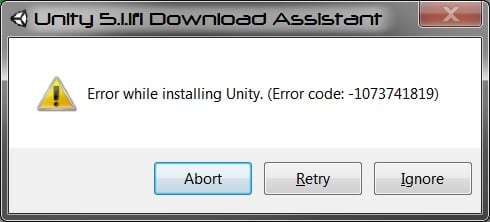
Наиболее часто с данной ошибкой встречаются пользователи ОС Виндовс 10, после перехода на неё с Виндовс 7. Возникновение данной ошибки не только мешает запуску программ с административными правами, но и просто не даёт установить в системе какой-либо новый софт. Каждый раз, когда пользователь пытается выполнить подобное, UAC (система контроля учётных записей пользователя) выдаёт ошибку 1073741819, по сути блокируя административную активность в операционной системе.
Основной причиной, как не странно, обычно является звуковая схема, которая перешла с вашей Windows 7 на Windows 10 при обновлении из одной ОС в другую. По определённым причина Виндовс 10 не способна проигрывать некоторые системные звуки звуковой схемы Виндовс 7, и, как результат, UAC блокирует административный доступ к системному функционалу.

Как исправить ошибку файловой системы 1073741819
В соответствии с вышеописанным, пресловутая ошибка исправляется следующими способами:
Способ 1. Измените звуковую схему на «по умолчанию»
Для этого перейдите в «Панель Управления» – «Звуки», найдите там параметр «Звуковую схема» и установите на «По умолчанию» (или «Windows по умолчанию»). Рассматриваемая мной ошибка после этого должна пропасть.
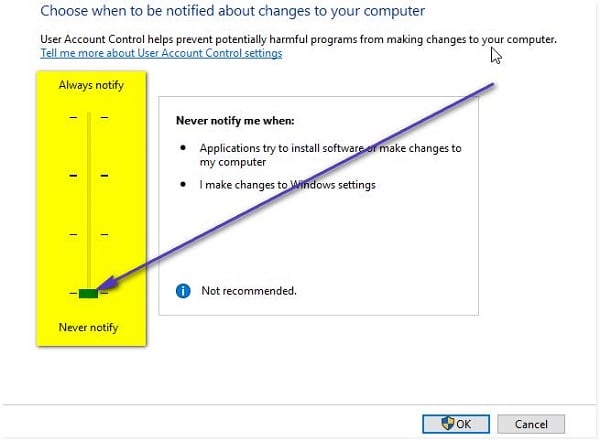
Рекомендую также отключить уведомления UAC, для чего откройте стартовое меню, найдите и кликните на «Контроль учётных записей пользователя» (User Access Control), нажмите на «Изменение параметров контроля учётной записи» (Change User Access Control»), и установите ползунок в самое нижнее значение.
Способ 2. Измените рабочую тему ОС Windows
Способ 3. Отключите UAC
Способ 4. Создайте другой пользовательский аккаунт
Ещё одним, и довольно эффективным способом решения проблемы 1073741819, будет создание новой учётной записи и работа с ней. Обычно в новой «учётке» рассматриваемая мной проблема пропадает.
Способ 5. Измените параметры питания
Способ 6. Удалите AVAST
В довольно редких случаях причиной рассматриваемой проблемы выступал функционал антивируса AVAST, установленного на компьютере пользователя. Для избавления от ошибки 1073741819 рекомендуется полностью удалить данный антивирус с вашего компьютера, заменив его более стабильной альтернативой.
Заключение
Основным решением проблемы «Ошибка файловой системы 1073741819» является схема звуковой схемы, использующейся по умолчанию в ОС Windows. Если данный вариант не помог, попробуйте другие, перечисленные мной, советы, они помогут устранить ошибку 1073741819 на ваших ПК.
Process returned 1073741819 0xc0000005 что значит

Apparently, 0xC0000005 is the code for an access violation. Look at this guy’s question: http://tech.groups.yahoo.com/group/OpenCV/message/59196
Is there possibly a way to get around this? Recursion has never let me down before, and I found it extremely weird that it just all of a sudden did. Granted, I think 354 recursive calls is a tremendous amount, nonetheless, but I don’t understand how else to go about this problem.
I’d love to be able to get 50,000 recursion, but I come no where close, and I’m not even using objects. I don’t believe this is causing memory leaks, but I have no clue, I’ve never encountered something like this before.
| Are you only allowed to have recursion so deep? |
I’m not sure if that is your problem here or not, but yes you can only go so deep in recursion before your stack overflows.
When a function is called, stuff is put on the stack, and only unloaded when the function returns. With recursion a function keeps calling itself without returning, and things keep piling onto the stack.
| The stack in action Because parameters and local variables essentially belong to a function, we really only need to consider what happens on the stack when we call a function. Here is the sequence of steps that takes place when a function is called: The address of the instruction beyond the function call is pushed onto the stack. This is how the CPU remembers where to go after the function returns. The function’s return value is copied into the placeholder that was put on the stack for this purpose. Process returned 1073741819 0xc0000005 что значит
Ok, I’ve been struggling a lot with what I think is a minor tweak somewhere. Assignment is creating a jukebox which you can add albums to. Can anyone notice anything obvious? Am I not initializing the vector? Is that really needed? THIS IS EATING ME UP
There is no need for it, the constructor will do it for you.
I think the problem code is elsewhere (in code you haven’t posted.) The vector member will be initialised (by its default constructor) as part of the construction of the Jukebox class. So there’s nothing you need the change about that. 0xC0000005 = Access Violation, so somewhere code is trying to access inaccessible memory. Have you got a stack trace for the crash? The debug build can behave differently for a number of reasons. One of them is that the debug memory allocation routines will fill newly allocated memory with a file pattern, whereas the normal allocation routines don’t bother. They will be left with what ever random values were found there. So it’s good practice to initialize newly allocated memory/variables.
So, when reading from file it is supposed to read like this: Album name1 Overloaded >> is done in three classes: song, songTime and album: What makes it work in debug mode? It’s confusing me I have a const char DELIM = ‘|’; in constants.h When running it in repl.it I instead get error free(): invalid pointer.
Luck. Plain simple luck. It happens all the time. The code contains a bug, but sometimes if works anyway. Most programs work by accident, not by design. One problem with memory access problems is that the bug can be in one place while the symptom shows up somewhere completely different. For this reason, you need to post your entire program for us to help.
0xC0000005 = Access Violation, so somewhere code is trying to access inaccessible memory. Have you got a stack trace for the crash? |
Very plausible!
I don’t know how to get a stack trace from CLion, I can see if I can figure something out!
Ok, I’m just dumb. I had a destructor that was just deleting the song vector everytime program ran.
Thanks for the help nodding me to the right direction, I would have just continued watching the two functions that were invloved otherwise!
I’m sure I’ll run into some more problems along the way, I WILL BE BACK!
Comments
bglee85 commented Mar 19, 2019
This is my simple coding:-
import tensorflow as tf
print(«Hi»);
The «Hi» is not printed. I searched online for this issue, but seems like none of the people has this, so it has been bugging me for few days.
No GPU involved, just the CPU version of tensorflow.
I tried v1.13, v1.12, v1.11, and v.1.10, all gave the me the same issue.
I tried with python 3.5., 3.6., and 3.7.*, also same result.
Tried with LiClipse, PyCharm, Atom, all gave the same result as well.
It works before, but suddenly one day it didn’t work anymore, so I have no idea what happen.
Tried to uninstall any apps that installed within few weeks, but didn’t solve the issue.
I really wish someone can help me to solve this issue.
The text was updated successfully, but these errors were encountered:
ziruizhuang commented Mar 19, 2019
The same thing goes here. I have tried to install tensorflow through pip and tensorflow_mkl with conda. Another installation on a different machine which uses a GPU version tensorflow works just fine. Tried to remove and reinstall python environment to avoid any possible dependency issue, not working.
Since 0xC0000005 often comes from DLL importing issue on Windows, I checked the event log of Windows, the error comes from python.exe obviously, and the error module is unknown(which should be the dll name if any). The error report info goes as follows,
I checked that the CPU is Core i7-4790 which has AVX2 capability, so that it shouldn’d be a problem about AVX right?
ziruizhuang commented Mar 19, 2019
Also it worth mentioning that a custom py37-win-x64 build on branch r1.13 with cherry-pick ec72701 by VS2017 also facing the same problem. I haven’t had time to build a cpu version on the other computer, so it is unclear whether the issue is related to code or the environment (either system or python).
jvishnuvardhan commented Mar 19, 2019
@bglee85 Could you uninstall python and tensorflow, restart system and install python and tensorflow following these instructions. This procedure is for installing TF1.12 but you can follow similar procedure to install higher version of TF. Please let me know how it progresses. Thanks!
bglee85 commented Mar 20, 2019 •
I was quite urgent to use the tensorflow-gpu, so I reset my windows and reinstall everything. It works with the following conditions:-
CUDA 10.0, cudnn 7.5, python-3.6.8, tensorflow & tensorflow-gpu 1.13.1
Windows 10, i9, GTX 1050 Ti
I wish there is a better way to solve the issue without resetting the windows, but I didn’t have time to try other options one by one.
** On side note, I did try with CUDA 9.0 (installation failed), CUDA 9.2 (works fine with tensorflow 1.12 but didn’t work with tensorflow-gpu 1.12, I think is the graphic driver is higher version) and CUDA 10.1 (similar to CUDA 9.2, but works with tensorflow-1.13.1, not 1.12). All associated with the respective cudnn-7.5.
** Also, I ran the deviceQuery.exe, and the result came back with CUDA Driver Version = 10.1, CUDA Runtime = 10.0, so I tried to install the CUDA 10.1 Runtime instead, but it didn’t work on python-3.6.8, I haven’t try with python 3.7.2 yet.
I did some search online regarding to the issue of 0x000000CD, it looks like the the process wasn’t able to continue due to several issues, but some said is memory corrupted, so I could suggest uninstall the Anaconda, and reinstall everything again (I didn’t try it, but I hope it works rather than reset the windows).
Comments
fzumstein commented Jul 17, 2018
The text was updated successfully, but these errors were encountered:
thopiekar commented Jul 18, 2018 •
It is only guessing but dt.datetime.now() returns a DateTime object and wb.Worksheets(«Sheet1»).Range(«A1»).Value most likely doesn’t understand it. Make sure you pass a data format, which this value understands. E.g. an integer or something similar.
fzumstein commented Jul 18, 2018
Setting the value is working fine (it automatically formats the target cell as date cell in Excel). It’s only the last line which fails, but that was handled correctly from python 2.6-3.6 (it returns a ), only 3.7 is causing issues.
thopiekar commented Jul 18, 2018
Oh, well, then this is worrying, of course.
idle-user commented Jul 18, 2018 •
Just to add on.I’ve been getting similar errors when dealing with datetime in objects.
I also noticed that I have to correctly case attributes to get the value.
There’s other little things I had to change to get it kinda working, but the date one just breaks my code.
All of this was working fine before 3.7.
cgohlke commented Jul 20, 2018
Works for me with binaries from https://www.lfd.uci.edu/
fzumstein commented Jul 20, 2018
Great, thanks! Can we fix the pypi version accordingly.
thopiekar commented Jul 21, 2018
Well, I find it more interesting what the differences are? Whether they made changes to the code or not. 😏
cgohlke commented Jul 21, 2018
I was using git master, the following patch, Visual Studio 2017, and Windows SDK 8.1. You’ll also need python/cpython#8271 or another workaround.
thopiekar commented Jul 21, 2018
Could you be so kind an prepare a pull request with these changes?
It would help a lot.
Also @mhammond can review it more easily here and our CI can test whether it really builds. So we know there are no typos.
Finally, when you make changes and it gets merged, then you get the credits here on the repo for your work, of course.